Start with India-linked Clueso, then explore four updates for making visuals, videos and teaching materials. Each story includes a small workflow to try and links to the original sources.
5 updates5-minute readIndia focus
01 / Video · India
Clueso raises $10 million to expand AI video creation
Funding announced 13 October 2026 · Existing product available
Clueso, founded by IIT Madras alumni and based in Bengaluru and San Francisco, announced new funding on 13 October. Its platform combines workflow recording, scripts, voiceovers and editing; the investment will support further development. The funding announcement does not mean all these features launched that day.
TRY IT
Turn a one-minute ‘How to upload an assignment’ screen recording into a Learn AI Simple tutorial. Review the narration before making a Hindi version.
Before you try: The free plan lists 10 minutes of video exports per month, up to 1080p, with limited AI credits. English and Hindi are explicitly supported; translation access depends on your plan.
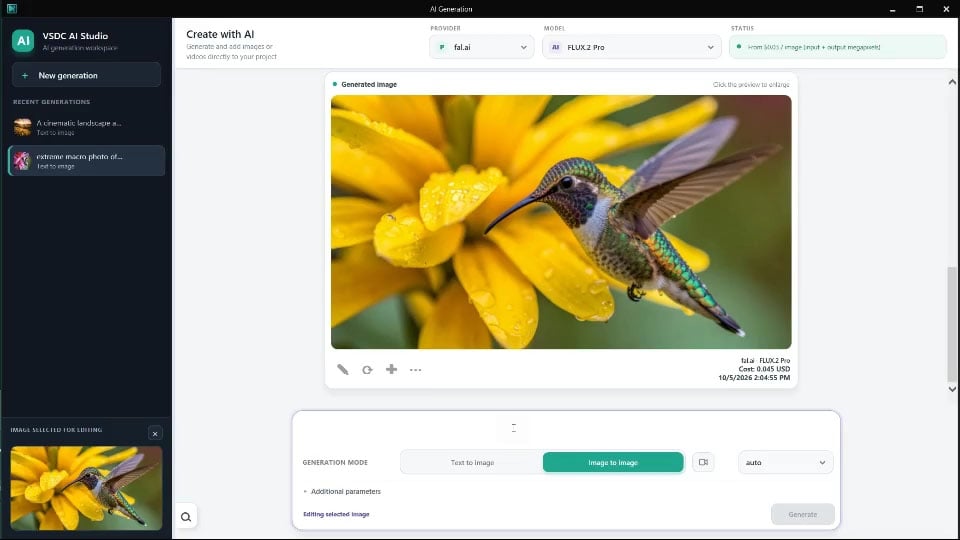
VSDC 11.3, available for Windows, can generate images and clips through fal.ai, then place them directly into your project. It also supports prompt-based image changes. Connect a fal.ai account and review the estimated generation cost before submitting. The announcement appeared on 13 October; VideoHelp lists the version from 9 October.
TRY IT
Prompt: ‘A five-second, slow camera move across a colourful Indian classroom, morning light, no text.’ Add your checked Telugu or Tamil title separately during editing.
Before you try: AI generation is charged separately through fal.ai. Connecting it requires a fal.ai account and API key; VSDC shows an estimated cost before generation.
On 13 October, Automo announced that Desygner’s creative suite is now free, with its transition to Automo Design happening over the coming weeks. AI generation and heavier usage remain paid. Automo is still in alpha, and its Mo assistant on WhatsApp and iMessage is invite-only.
TRY IT
Make one vertical workshop poster using an existing illustration. Add a short English headline and a manually checked Telugu translation, then preview it at phone size before moving existing projects.
Before you try: The creative suite is free within usage limits. AI generation and heavier use are separately paid; WhatsApp and iMessage early access requires an invitation.
Mote’s 13 October update lets teachers open SMART Board .notebook files from Google Drive or their computer and turn them into usable PDFs. It is a practical addition to Mote’s existing teaching and accessibility tools.
TRY IT
If you have SMART Board lessons, open an old water-cycle lesson in Mote PDF, add three revision questions, and save the marked-up PDF back to Google Drive.
Before you try: Mote lists Hindi and Indian English for transcription and translation. Advanced read-aloud, transcription and text-translation features require Unlimited. Tamil and Telugu are absent from that published language list.
A case study published on 13 October describes Higgsfield’s workflow for producing instructional videos exceeding ten minutes. The company credits GPT-6 Astra with coordinating production tools and helping maintain visual consistency.
TRY IT
Plan a 60-second lesson as three scenes. Reuse the same character reference, colours and setting in every scene, then add narration. Check continuity before attempting a longer lesson.
Before you try: This is a newly published case study. It does not establish a new launch date, universal access or a one-click ten-minute-video feature.
Published 14 October 2026. Availability, language support and plan limits reflect the sources checked for this edition and may change. Promotional artwork is labelled; image rights remain with their respective owners.
 Image unavailable. View the official source.